In short
- Discover is the grid: Dudes around you, best matches first, with age, distance, online status, and a match % on each tile.
- The match score looks both ways — how he fits what you're into AND how you fit what he's into — plus a closeness bonus.
- It's computed from your "I Am" / "I Am Into" tags. No tags, no score — fill your profile.
- Search (on your Status screen) filters by anything; your DudesList keeps favourites — Hotties 🔥 and Buddies 🤝, private to you.
The Discover grid
The Discover tab shows every approved, verified Dude around you. Each tile carries the essentials: photo, username, a green dot when he's online (active in the last five minutes), age, distance, and the match percentage. Switch between the photo grid and a denser list view, whichever way you like to browse.
- Sort by Match (the default: best fits first), Distance (closest first), Recent (freshly active first), or Visitors: the Dudes who viewed your profile, most recent first.
- Filter by Online only, by your DudesList with the Dudes filter (Hotties, Buddies, or both), and by current mood — "online Dudes near me who are up for clubbing tonight" is three taps.
Members can browse up to 288 profiles per session; Supporters browse without limit.
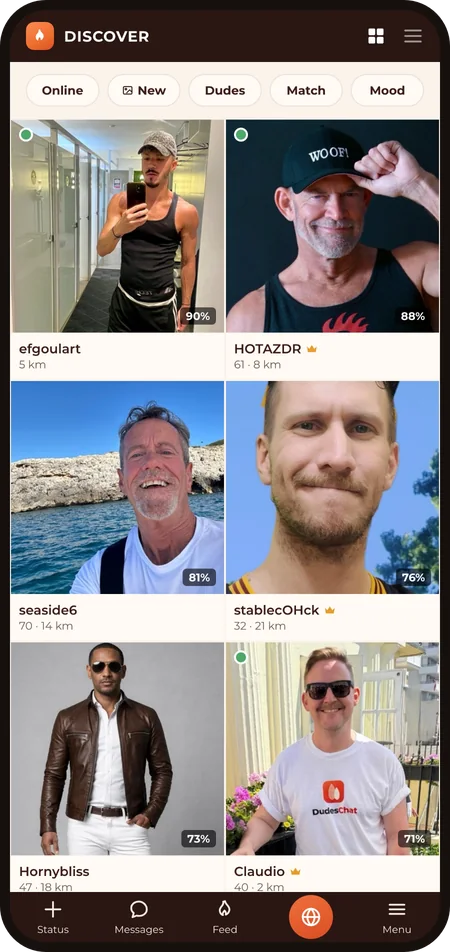
How the match % works — it looks both ways
The score isn't "how similar are you" — it's mutual fit, computed from the "I Am" and "I Am Into" tags on both profiles:
- Your direction: how much of what you're into does he match?
- His direction: how much of what he's into do you match?
- The two are averaged, so a high score means the interest points both ways, not only yours. That's about 80% of the score.
- The remaining ~20% is a closeness bonus: full at your doorstep, fading to nothing at around 100 km. Compatibility that can't meet for coffee is worth a little less.
The catch, and your lever: the score can only work with the tags it's given. No "I Am" / "I Am Into" tags means a 0% match with everyone, and the bottom of every match-sorted list — not because nobody fits you, but because the app has nothing to go on. Two minutes in Menu → Sexual identity setting your tags is the single biggest upgrade you can give your Discover results.
Search — when you know what you're looking for
Discover is for browsing; Search (Status → Search) is for hunting. Filter by the basics (age, distance, online, verified, with photos), by hobbies, languages, "I Am" / "I Am Into" tags, kinks, and health & protection choices. Results come back sorted by match.
Two things worth knowing: every filter works on what Dudes chose to share — hidden sections can't be searched, in either direction. And categories you've switched off in your own Viewing Preferences don't appear as filters at all.
Your DudesList — Hotties & Buddies
Found someone worth keeping? On his profile, tap DudesList and file him as a 🔥 Hottie or a 🤝 Buddy. The list is yours alone:
- He is not notified, and nobody can see your lists. It changes nothing about messaging or access; it's your personal address book.
- Your lists live under Menu → Hotties and Menu → Buddies, and Discover's Dudes filter narrows the grid to them. "Which of my Buddies is online right now?" is one filter away.
Who's real in the grid
Everyone. Only profiles with a human-reviewed photo and a verified account appear in Discover at all — the empty-profile bot armies that clog other apps never make it in. That's the verification promise doing its job where it counts.
Last revised: 2026‑09‑12