In short
- In the app: Menu → My Account → Delete account, confirmed with your password.
- Without the app: email support@dudes.chat from your account's email address, or use the contact form.
- Your profile disappears immediately. Your data is permanently deleted after 30 days.
- We keep only what the law or the safety of other members requires — listed below.
This page covers the DudesChat app by Theme Park AG — it's the same account whether you use DudesChat on Android, iPhone or the web.
Delete your account in the app
- Open the Menu and tap My Account.
- Tap Delete account, read the notice, and tap Continue.
- Enter your password — the one you sign in with — and tap Delete account.
That's it. You're signed out on every device straight away, and your profile is gone from the app.
Also a DudesNude member? If you have a DudesNude account too, My Account offers two options. Delete App Account removes only DudesChat — your app photos, messages and DudesList — and leaves your DudesNude account untouched. Delete All Accounts deletes both.
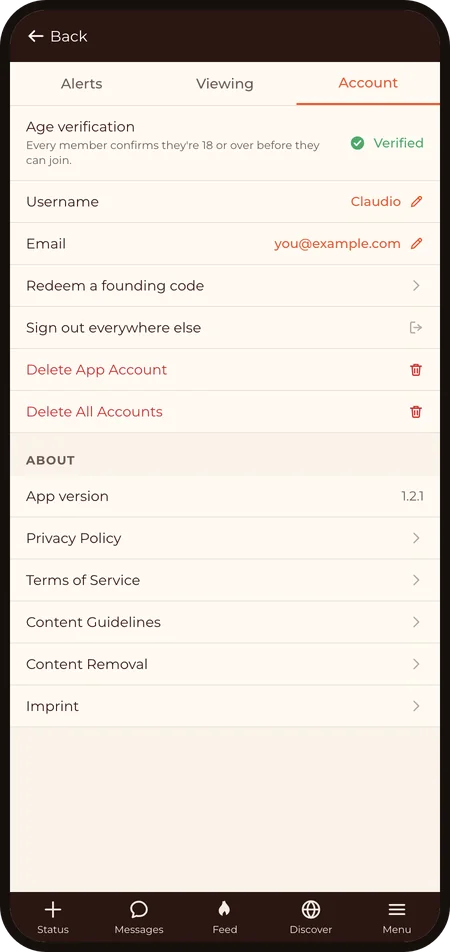
Request deletion without the app
Uninstalled it, locked out, or just prefer to ask? You don't need the app to delete your account:
- Email support@dudes.chat from the email address on your account, with your username and the subject "Delete my DudesChat account".
- Or use the contact form (topic: Privacy & data) — give us the email address on your account and ask us to delete it.
We reply within 1 business day (4 at most), confirm it's you by writing back to the address on the account, and delete it. You'll get a short confirmation once it's done.
What is deleted, and when
- Immediately: your profile is hidden from everyone, you're signed out everywhere, and nobody can message you.
- For 30 days: your data is held, deactivated, so the account can be restored if you deleted it by mistake — just contact us within those 30 days. (If you chose "Delete App Account", simply signing back in restores it.)
- After 30 days: your profile, photos, albums, DudesList, settings and sign-in sessions are permanently deleted — including the photo and video files themselves. This can't be undone.
What we keep
A few things remain after deletion, either because the law requires it or because they protect other members:
- Legal and compliance records — payment records, abuse reports and the age-verification audit trail, for as long as the law requires.
- Messages you exchanged — the conversation stays on the other person's side for 7 days, exactly as it would after a block, then disappears from their inbox. The messages themselves are deleted with the rest of your data after 30 days, unless they're under a report or a legal hold.
- Content under an open report — if something you posted is being reviewed, it's kept until the case is decided, then deleted.
The Privacy Policy is the complete, legally binding version — including your rights under Swiss and EU data-protection law (access, correction, export, erasure).
Before you go
- Want a copy of your data first? Ask via the contact form before you delete — once the 30 days are over, there's nothing left to export.
- Just need a break? Logging out is enough. Nobody's deleted for being away.
- Supporter? A subscription is managed by the app store you bought it in and isn't cancelled by deleting your account — cancel it there first. See Account, Supporter & billing.
Last revised: 2026‑09‑12